
Descoberta de esquema, geração de SQL e EXPLAIN com Claude Code e Db2 12.1
Um tutorial completo — desde um container Docker vazio até uma sessão do Claude Code que compreende perguntas em linguagem natural sobre uma base de dados Db2, gera e executa SQL, e explica os planos de acesso em linguagem simples.
O que vamos construir
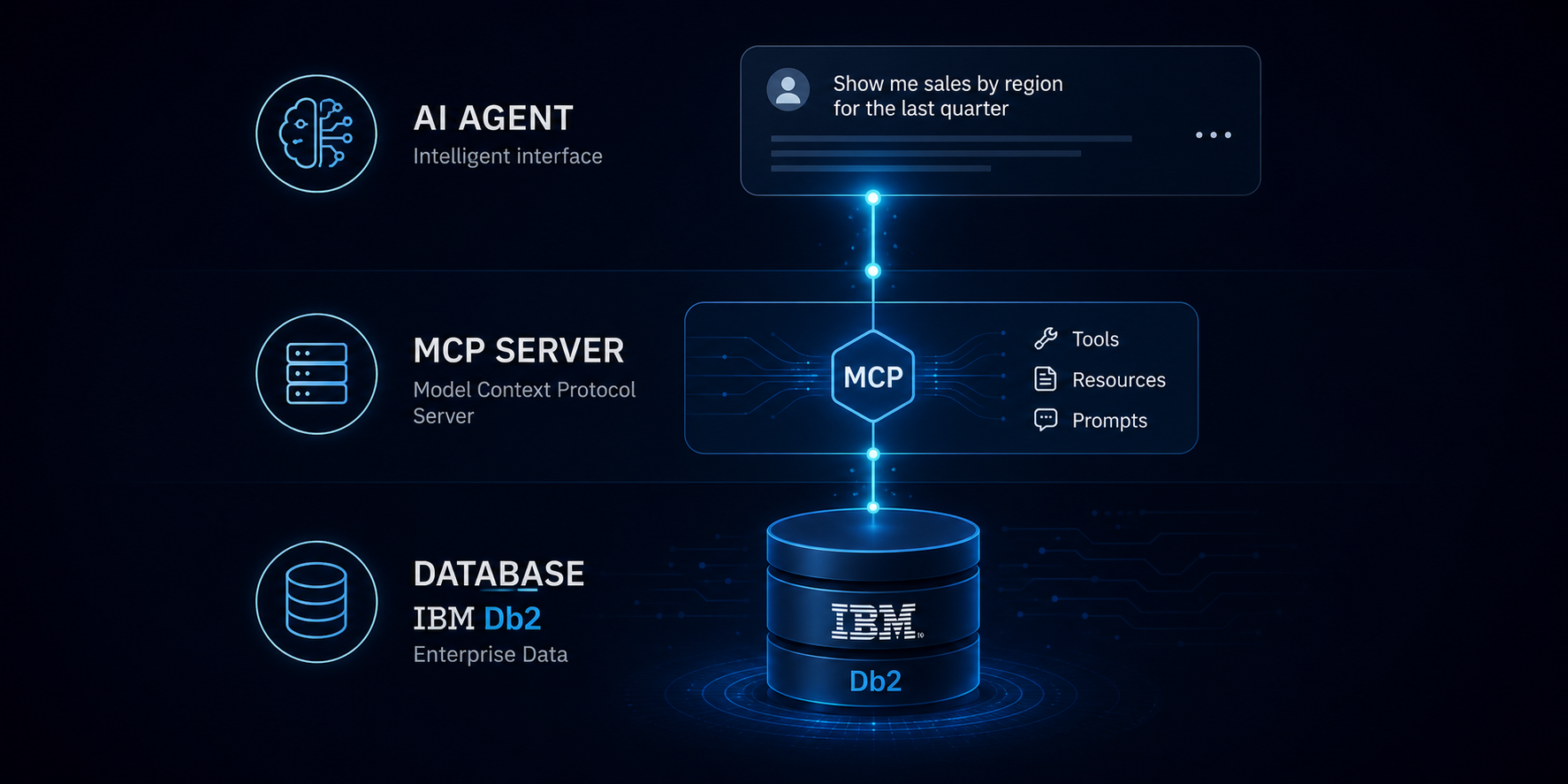
Um servidor MCP que liga o Claude Code directamente ao IBM Db2 LUW 12.1 usando o driver Python nativo ibm_db. Sem intermediário REST, sem containers adicionais. O servidor expõe oito ferramentas e um recurso:
| Ferramenta | Função |
|---|---|
list_schemas() | Descobrir schemas dentro da base de dados ligada |
list_tables(schema) | Tabelas de um schema com estatísticas |
describe_table(schema, table) | Definições de colunas, tipos, nullability |
list_indexes(schema, table) | Índices com cluster ratio e colunas chave |
sample_rows(schema, table) | Pré-visualizar até 20 linhas |
execute_query(sql) | Executar qualquer SELECT — o motor SQL em linguagem natural |
explain_query(sql) | EXPLAIN + interpretação em linguagem simples do plano de acesso |
search_columns(name) | Encontrar todas as tabelas que contêm uma coluna pelo nome |
table_dependencies(schema, table) | Objectos que referenciam uma tabela |
Arquitectura
Claude Code  (linguagem natural)
      |
      |  JSON-RPC via stdio
      v
server.py  (Servidor MCP)
      |
      |  TCP 50000  (ibm_db / clidriver — ligação directa)
      v
IBM Db2 LUW 12.1 Community Edition  (Docker, porta 50000)
O pacote Python ibm_db inclui o IBM CLI driver e gere a ligação. Não é necessária nenhuma instalação separada do cliente Db2.
Pré-requisitos
- Uma máquina com Linux
- Docker e Docker Compose
- Python 3.10 ou superior
- Claude Code
Parte 1 — Ambiente Docker
Criar o directório de trabalho e entrar nele antes de criar o ficheiro docker-compose.yml:
mkdir db2-mcp-tutorial
cd db2-mcp-tutorial
1.1 docker-compose.yml
A configuração é bastante simples. Apenas um container a correr a instância Db2.
Criar o ficheiro directamente da shell:
cat > docker-compose.yml <<'EOF'
services:
  db2:
    image: icr.io/db2_community/db2:latest
    privileged: true
    environment:
      LICENSE: accept
      DB2INST1_PASSWORD: passw0rd
    ports:
      - "50000:50000"
    volumes:
      - db2_data:/database
    healthcheck:
      test: ["CMD", "su", "-", "db2inst1", "-c", "db2 list db directory"]
      interval: 30s
      timeout: 10s
      retries: 15
      start_period: 600s

volumes:
  db2_data:
EOF
1.2 Iniciar o container
Executar para arrancar o container Db2.
docker compose up -dO primeiro arranque realiza a configuração completa da instância e da base de dados Db2. Pode demorar cerca de 3 a 5 minutos.
Aguardar algum tempo e verificar o estado do container:
docker psSe ainda estiver a iniciar, aguardar cerca de 30 segundos e verificar novamente:
sleep 30
docker ps
Não avançar para o passo seguinte enquanto o container não estiver healthy.
1.3 Criar os objectos de exemplo SAMPLE
Executar db2sampl apenas depois de o container estar healthy:
docker compose exec db2 su - db2inst1 -c "db2sampl -sql -force"
# Demora cerca de 60 segundos
Verificar que a base de dados e os objectos de esquema estão presentes:
docker compose exec db2 su - db2inst1 -c \
  "db2 connect to SAMPLE && db2 'select count(*) as employee_count from employee' && db2 connect reset"
# Esperado: 42
Criar as tabelas EXPLAIN no schema:
docker compose exec db2 su - db2inst1 -c \
  "db2 connect to SAMPLE && db2 -tf /database/config/db2inst1/sqllib/misc/EXPLAIN.DDL && db2 connect reset"
Parte 2 — Estrutura do Projecto e Dependências
O projecto tem esta estrutura.
db2-mcp-tutorial/
|- docker-compose.yml
|- server.py
|- pyproject.toml
`- .env
Criar o ficheiro pyproject.toml directamente da shell:
cat > pyproject.toml <<'EOF'
[project]
name = "db2-schema-mcp"
version = "0.1.0"
requires-python = ">=3.10"
dependencies = [
    "mcp[cli]>=1.25",
    "ibm-db>=3.2.0",
    "python-dotenv>=1.0",
]
EOF
Criar o ambiente Python local e instalar as dependências do projecto:
uv venvcria um ambiente virtual isolado em.venvuv pip install -e .instala o pacote em modo editável e descarrega as dependências declaradas empyproject.toml
uv venv && uv pip install -e .O ibm_db descarrega e instala o IBM CLI driver automaticamente. Não é necessária nenhuma instalação separada do cliente Db2.
Criar o ficheiro de ambiente:
cat > .env <<'EOF'
DB2_HOST=localhost
DB2_PORT=50000
DB2_DBNAME=SAMPLE
DB2_USER=db2inst1
DB2_PASSWORD=passw0rd
EOF
Parte 3 — O Servidor MCP (server.py)
Um servidor MCP é um pequeno processo local que expõe capacidades a um cliente de IA de forma estruturada. Em vez de deixar o modelo inventar como chegar ao Db2, o servidor MCP fornece-lhe ferramentas explícitas como list_tables, describe_table, execute_query e explain_query.
Na prática, isto significa que o servidor MCP fornece duas coisas:
- Uma ponte controlada entre o Claude Code e a base de dados Db2
- Uma superfície de ferramentas definida que o modelo pode chamar de forma segura e previsível
Para este artigo, o server.py é essa ponte. Recebe chamadas de ferramentas do Claude Code via MCP, abre uma ligação ibm_db directa ao Db2, executa a operação de metadados ou SQL solicitada, e devolve o resultado num formato que o agente pode interpretar.
Para criar o ficheiro server.py, abrir uma sessão vi:
vi server.pyE colar este conteúdo no ficheiro:
"""
MCP Server — Db2 Schema Explorer
Explores tables, columns, indexes and sample data from an IBM Db2 database.
Connects directly via ibm_db driver (no REST Service required).
Compatible with Db2 LUW 12.1 Community Edition running in Docker.
"""
import os
import threading
import ibm_db
from dotenv import load_dotenv
from mcp.server.fastmcp import FastMCP
load_dotenv()
# ── Configuration ─────────────────────────────────────────────────────────────
DB2_HOST = os.getenv("DB2_HOST", "localhost")
DB2_PORT = os.getenv("DB2_PORT", "50000")
DB2_DBNAME = os.getenv("DB2_DBNAME", "SAMPLE")
DB2_USER = os.getenv("DB2_USER", "db2inst1")
DB2_PASS = os.getenv("DB2_PASSWORD", "passw0rd")
_DSN = (
f"DATABASE={DB2_DBNAME};"
f"HOSTNAME={DB2_HOST};"
f"PORT={DB2_PORT};"
f"PROTOCOL=TCPIP;"
f"UID={DB2_USER};"
f"PWD={DB2_PASS};"
"CONNECTTIMEOUT=30;"
"QUERYTIMEOUT=120;"
)
# ── Connection management ─────────────────────────────────────────────────────
# ibm_db is a synchronous C extension — not thread-safe per connection.
# A global lock serialises all queries. For high-concurrency production use,
# create a new connection per request instead.
_conn_lock = threading.Lock()
_conn: object = None
def _get_conn():
"""Return the active Db2 connection, reconnecting automatically if needed."""
global _conn
try:
if _conn is not None:
ibm_db.active(_conn) # raises if connection is dead
return _conn
except Exception:
_conn = None
_conn = ibm_db.connect(_DSN, "", "")
return _conn
def run_sql(query: str) -> list[dict]:
"""
Execute a SELECT statement and return the result set as a list of dicts.
Thread-safe via global connection lock.
"""
with _conn_lock:
conn = _get_conn()
stmt = ibm_db.exec_immediate(conn, query)
rows: list[dict] = []
row = ibm_db.fetch_assoc(stmt)
while row:
rows.append(dict(row))
row = ibm_db.fetch_assoc(stmt)
ibm_db.free_result(stmt)
return rows
def run_admin_cmd(command: str) -> list[dict]:
"""
Execute an administrative Db2 CLP command via SYSPROC.ADMIN_CMD.
Returns the result set as a list of dicts.
ADMIN_CMD runs commands like LIST DATABASE DIRECTORY, RUNSTATS, etc.
as a stored procedure — no shell access or docker exec required.
"""
with _conn_lock:
conn = _get_conn()
stmt = ibm_db.exec_immediate(
conn, f"CALL SYSPROC.ADMIN_CMD(\'{command}\')"
)
rows: list[dict] = []
row = ibm_db.fetch_assoc(stmt)
while row:
rows.append(dict(row))
row = ibm_db.fetch_assoc(stmt)
ibm_db.free_result(stmt)
return rows
# ── MCP Server ────────────────────────────────────────────────────────────────
mcp = FastMCP(
"db2-schema-explorer",
instructions=(
"You are a Db2 database assistant with tools to inspect an IBM Db2 LUW database.\n\n"
"CRITICAL — DATABASE vs SCHEMA:\n"
"In Db2, the database name (e.g. SAMPLE) is the connection target — it is NOT a schema. "
"Schemas are namespaces INSIDE the database (e.g. DB2INST1, SYSCAT, SYSTOOLS). "
"Never use the database name as a schema parameter.\n\n"
"WORKFLOW:\n"
"0. When the user asks what databases exist on the server, call list_databases().\n"
"1. When the user asks about tables 'in the database' or mentions the database name "
"(e.g. SAMPLE), ALWAYS call list_schemas() first to discover which schemas actually "
"exist — do not assume the database name is a schema.\n"
"2. Then call list_tables(schema) for each schema of interest.\n"
"3. Never guess or assume a schema name. "
"The instance owner schema is typically DB2INST1, not the database name.\n\n"
"TOOL SUMMARY:\n"
"- list_databases() list all databases in the Db2 instance\n"
"- list_schemas() discover all schemas in the database\n"
"- list_tables(schema) tables in a specific schema\n"
"- describe_table(schema,table) column definitions\n"
"- list_indexes(schema,table) index definitions\n"
"- sample_rows(schema,table) preview a few rows (max 20, no filtering)\n"
"- execute_query(sql) run any SELECT — USE THIS for filtering, "
"aggregation, subqueries, joins, ranking, or any analytical question\n"
"- explain_query(sql) explain the access plan for a SELECT and "
"interpret index usage, joins, sorts and cost estimates\n"
"- search_columns(name) find tables that have a column by name\n"
"- table_dependencies(schema,table) objects that depend on a table\n\n"
"WHEN TO USE execute_query:\n"
"Whenever the user asks a question that requires SQL logic — averages, totals, "
"comparisons, filters, GROUP BY, subqueries — generate the correct SQL and call "
"execute_query(sql). Never approximate by sampling rows and calculating manually. "
"Always use fully qualified table names (SCHEMA.TABLE) in the SQL.\n\n"
"Always use uppercase for all schema and table names."
),
)
@mcp.tool()
def list_databases() -> str:
"""
List all databases registered in the Db2 instance directory.
Uses SYSPROC.ADMIN_CMD to run the Db2 CLP command
LIST DATABASE DIRECTORY, which shows every database catalogued
on this instance: name, alias, type (local/remote), and path.
Call this first when the user wants to know what databases are
available on the server, or before connecting to a specific database.
"""
try:
rows = run_admin_cmd("LIST DATABASE DIRECTORY")
except Exception as exc:
return f"Failed to list databases: {exc}"
if not rows:
return "No databases found in the instance directory."
lines = [f"**Databases in instance directory** ({len(rows)} found)\n"]
for r in rows:
alias = r.get("DATABASE_ALIAS", r.get("DB_ALIAS", "?"))
name = r.get("DATABASE_NAME", r.get("DB_NAME", alias))
db_type = r.get("DATABASE_TYPE", r.get("TYPE", "?"))
path = r.get("DATABASE_DIRECTORY", r.get("DIRECTORY", ""))
comment = r.get("COMMENT", "")
lines.append(f"### `{alias}`")
if name != alias:
lines.append(f"- Name : `{name}`")
lines.append(f"- Type : {db_type}")
if path:
lines.append(f"- Directory : `{path}`")
if comment:
lines.append(f"- Comment : {comment}")
return "\n".join(lines)
@mcp.tool()
def list_schemas() -> str:
"""
List all user-defined schemas in the database.
Returns schema name, owner, and creation timestamp.
All Db2 system schemas are excluded (SYS*, SYSIBM, NULLID, SQLJ,
ERRORSCHEMA, SYSTOOLS, DB2GSE, ASMA, SYSPROC).
Call this first whenever the user asks about tables or objects in the
database — do not assume the database name is a schema.
"""
rows = run_sql("""
SELECT SCHEMANAME, OWNER, CREATE_TIME
FROM SYSCAT.SCHEMATA
WHERE SCHEMANAME NOT LIKE 'SYS%'
AND SCHEMANAME NOT IN (
'NULLID', 'SQLJ', 'ERRORSCHEMA',
'SYSTOOLS', 'DB2GSE', 'ASMA', 'SYSPROC'
)
ORDER BY SCHEMANAME
""")
if not rows:
return "No user-defined schemas found."
lines = [f"**Available schemas** ({len(rows)} found)\n"]
for r in rows:
created = str(r.get("CREATE_TIME", ""))[:10]
lines.append(
f"- `{r['SCHEMANAME']}` "
f"(owner: {r.get('OWNER', '?')}, created: {created})"
)
return "\n".join(lines)
@mcp.tool()
def list_tables(schema: str) -> str:
"""
List all tables in a given schema with basic statistics.
Parameters:
schema — schema name (e.g. SAMPLE, DB2INST1). Case-insensitive.
Returns table name, estimated row count (CARD), page count, and last
access date. CARD = -1 means statistics have never been collected
(run RUNSTATS to update).
"""
schema = schema.upper()
rows = run_sql(f"""
SELECT TABNAME, TYPE, CARD, NPAGES, LASTUSED
FROM SYSCAT.TABLES
WHERE TABSCHEMA = '{schema}'
AND TYPE = 'T'
ORDER BY TABNAME
""")
if not rows:
return f"No tables found in schema `{schema}`."
lines = [
f"**Tables in `{schema}`** ({len(rows)} found)\n",
"| Table | Rows (CARD) | Pages | Last used |",
"|-------|-------------|-------|-----------|",
]
for r in rows:
card = r.get("CARD", "?")
npages = r.get("NPAGES", "?")
last_used = str(r.get("LASTUSED", "—"))[:10]
card_flag = " ⚠" if card == -1 else ""
lines.append(
f"| `{r['TABNAME']}` | {card}{card_flag} | {npages} | {last_used} |"
)
if any(r.get("CARD") == -1 for r in rows):
lines.append(
"\n⚠ Tables with CARD = -1 have no statistics. "
"Run `RUNSTATS ON TABLE <schema>.<table>` to collect them."
)
return "\n".join(lines)
@mcp.tool()
def describe_table(schema: str, table: str) -> str:
"""
Describe the column structure of a table.
Parameters:
schema — schema name (e.g. SAMPLE)
table — table name (e.g. EMPLOYEE)
Returns each column's name, data type (with length/scale), nullability,
default value, identity flag, and any column remarks.
"""
schema = schema.upper()
table = table.upper()
rows = run_sql(f"""
SELECT COLNO, COLNAME, TYPENAME, LENGTH, SCALE,
NULLS, DEFAULT, IDENTITY, GENERATED, REMARKS
FROM SYSCAT.COLUMNS
WHERE TABSCHEMA = '{schema}'
AND TABNAME = '{table}'
ORDER BY COLNO
""")
if not rows:
return f"Table `{schema}.{table}` not found or has no columns."
lines = [
f"**`{schema}.{table}`** — {len(rows)} column(s)\n",
"| # | Column | Type | Nullable | Identity | Default | Remarks |",
"|---|--------|------|----------|----------|---------|---------|",
]
for r in rows:
length = f"({r['LENGTH']})" if r.get("LENGTH") else ""
scale = f",{r['SCALE']}" if r.get("SCALE") else ""
col_type = f"{r['TYPENAME']}{length}{scale}"
nullable = "Yes" if r.get("NULLS") == "Y" else "**No**"
identity = "Yes" if r.get("IDENTITY") == "Y" else "—"
default = r.get("DEFAULT") or "—"
remarks = r.get("REMARKS") or "—"
lines.append(
f"| {r['COLNO']} | `{r['COLNAME']}` | `{col_type}` "
f"| {nullable} | {identity} | {default} | {remarks} |"
)
return "\n".join(lines)
@mcp.tool()
def list_indexes(schema: str, table: str) -> str:
"""
List all indexes defined on a table.
Parameters:
schema — schema name
table — table name
Returns index name, type (REG/CLUS/BLOK), uniqueness rule (PK/Unique/Non-unique),
number of leaf pages, tree levels, cluster ratio, and indexed columns
(including ASC/DESC ordering).
"""
schema = schema.upper()
table = table.upper()
rows = run_sql(f"""
SELECT
I.INDNAME,
I.UNIQUERULE,
I.INDEXTYPE,
I.NLEAF,
I.NLEVELS,
I.CLUSTERRATIO,
LISTAGG(
K.COLNAME || CASE K.COLORDER WHEN 'D' THEN ' DESC' ELSE '' END,
', '
) WITHIN GROUP (ORDER BY K.COLSEQ) AS COLUMNS
FROM SYSCAT.INDEXES I
JOIN SYSCAT.INDEXCOLUSE K
ON I.INDSCHEMA = K.INDSCHEMA
AND I.INDNAME = K.INDNAME
WHERE I.TABSCHEMA = '{schema}'
AND I.TABNAME = '{table}'
GROUP BY
I.INDNAME, I.UNIQUERULE, I.INDEXTYPE,
I.NLEAF, I.NLEVELS, I.CLUSTERRATIO
ORDER BY I.INDNAME
""")
if not rows:
return f"No indexes found on `{schema}.{table}`."
unique_map = {"U": "✅ Unique", "P": "✅ PK", "D": "No"}
lines = [
f"**Indexes on `{schema}.{table}`** ({len(rows)} found)\n",
"| Index | Type | Unique | Leaves | Levels | Cluster% | Columns |",
"|-------|------|--------|--------|--------|----------|---------|",
]
for r in rows:
cr = r.get("CLUSTERRATIO", -1)
cluster = f"{cr}%" if cr is not None and cr >= 0 else "?"
lines.append(
f"| `{r['INDNAME']}` "
f"| {r.get('INDEXTYPE', '?')} "
f"| {unique_map.get(r.get('UNIQUERULE', 'D'), '?')} "
f"| {r.get('NLEAF', '?')} "
f"| {r.get('NLEVELS', '?')} "
f"| {cluster} "
f"| `{r.get('COLUMNS', '?')}` |"
)
return "\n".join(lines)
@mcp.tool()
def sample_rows(schema: str, table: str, limit: int = 5) -> str:
"""
Preview the first N rows of a table.
Parameters:
schema — schema name
table — table name
limit — number of rows to return, between 1 and 20 (default: 5)
Returns the rows formatted as a Markdown table. Column values are
truncated to 50 characters to keep the output readable.
"""
schema = schema.upper()
table = table.upper()
limit = max(1, min(limit, 20))
rows = run_sql(f"""
SELECT * FROM {schema}.{table}
FETCH FIRST {limit} ROWS ONLY
""")
if not rows:
return f"Table `{schema}.{table}` is empty or does not exist."
headers = list(rows[0].keys())
lines = [
f"**`{schema}.{table}`** — first {len(rows)} row(s)\n",
"| " + " | ".join(headers) + " |",
"| " + " | ".join(["---"] * len(headers)) + " |",
]
for r in rows:
cells = [str(r.get(h, ""))[:50] for h in headers]
lines.append("| " + " | ".join(cells) + " |")
return "\n".join(lines)
@mcp.tool()
def execute_query(sql: str, max_rows: int = 100) -> str:
"""
Execute a read-only SQL SELECT statement and return the full result set.
Use this tool whenever the user asks a question that requires filtering,
aggregation, joining, subqueries, or any logic beyond a simple row preview.
Examples: averages, totals, rankings, comparisons, EXISTS, GROUP BY, HAVING.
Parameters:
sql — a valid Db2 SQL SELECT statement.
Must be a SELECT — INSERT, UPDATE, DELETE and DDL are rejected.
Schema and table names must be fully qualified (e.g. DB2INST1.EMPLOYEE).
max_rows — maximum number of rows to return (default: 100, maximum: 500).
The tool executes the SQL exactly as provided. Generate correct, complete SQL
before calling — do not call with placeholder or incomplete statements.
Example queries:
SELECT * FROM DB2INST1.EMPLOYEE
WHERE SALARY > (SELECT AVG(SALARY) FROM DB2INST1.EMPLOYEE)
ORDER BY SALARY DESC
SELECT WORKDEPT, COUNT(*) AS HEADCOUNT, AVG(SALARY) AS AVG_SALARY
FROM DB2INST1.EMPLOYEE
GROUP BY WORKDEPT
ORDER BY AVG_SALARY DESC
"""
# Safety: only allow SELECT statements
sql_stripped = sql.strip().upper()
if not sql_stripped.startswith("SELECT") and \
not sql_stripped.startswith("WITH"):
return (
"Error: only SELECT (or WITH ... SELECT) statements are allowed. "
"INSERT, UPDATE, DELETE and DDL are not permitted."
)
max_rows = max(1, min(max_rows, 500))
# Append FETCH FIRST if not already present
if "FETCH FIRST" not in sql_stripped:
sql = f"{sql.rstrip().rstrip(';')} FETCH FIRST {max_rows} ROWS ONLY"
try:
rows = run_sql(sql)
except Exception as exc:
return f"Query failed:\n```\n{exc}\n```"
if not rows:
return "Query executed successfully — no rows returned."
headers = list(rows[0].keys())
lines = [
f"**Query result** — {len(rows)} row(s)\n",
"| " + " | ".join(headers) + " |",
"| " + " | ".join(["---"] * len(headers)) + " |",
]
for r in rows:
cells = [str(r.get(h, ""))[:60] for h in headers]
lines.append("| " + " | ".join(cells) + " |")
if len(rows) == max_rows:
lines.append(
f"\n*Result limited to {max_rows} rows. "
"Pass a higher max_rows value to retrieve more.*"
)
return "\n".join(lines)
@mcp.tool()
def search_columns(column_name: str) -> str:
"""
Find all tables that contain a column matching the given name pattern.
Parameters:
column_name — full or partial column name to search for.
The search is case-insensitive and uses SQL LIKE
with wildcards on both sides (e.g. 'DATE' matches
ORDER_DATE, HIRE_DATE, etc.).
Returns schema, table, column name, data type, and nullability.
Results are limited to 50 rows and exclude system schemas.
"""
pattern = column_name.upper()
rows = run_sql(f"""
SELECT TABSCHEMA, TABNAME, COLNAME, TYPENAME, NULLS
FROM SYSCAT.COLUMNS
WHERE COLNAME LIKE '%{pattern}%'
AND TABSCHEMA NOT LIKE 'SYS%'
ORDER BY TABSCHEMA, TABNAME, COLNAME
FETCH FIRST 50 ROWS ONLY
""")
if not rows:
return f"No columns matching `%{pattern}%` found."
lines = [
f"**Columns matching `%{pattern}%`** ({len(rows)} found)\n",
"| Schema | Table | Column | Type | Nullable |",
"|--------|-------|--------|------|----------|",
]
for r in rows:
nullable = "Yes" if r.get("NULLS") == "Y" else "No"
lines.append(
f"| `{r['TABSCHEMA']}` | `{r['TABNAME']}` "
f"| `{r['COLNAME']}` | {r['TYPENAME']} | {nullable} |"
)
return "\n".join(lines)
@mcp.tool()
def table_dependencies(schema: str, table: str) -> str:
"""
List objects that depend on a given table: views, triggers, packages,
and stored procedures that reference it.
Parameters:
schema — schema name
table — table name
Useful before performing ALTER TABLE or DROP TABLE to understand
the impact on dependent objects.
"""
schema = schema.upper()
table = table.upper()
rows = run_sql(f"""
SELECT DNAME AS OBJECT_NAME, DTYPE AS OBJECT_TYPE, TABSCHEMA
FROM SYSCAT.PACKAGEDEP
WHERE BSCHEMA = '{schema}'
AND BNAME = '{table}'
AND BTYPE = 'T'
UNION ALL
SELECT VIEWNAME, 'V', VIEWSCHEMA
FROM SYSCAT.VIEWDEP
WHERE BSCHEMA = '{schema}'
AND BNAME = '{table}'
ORDER BY OBJECT_TYPE, OBJECT_NAME
""")
if not rows:
return (
f"No dependencies found for `{schema}.{table}`.\n\n"
"This does not guarantee the table is unused — "
"application-level references are not tracked here."
)
type_map = {
"V": "View",
"R": "Stored Procedure",
"F": "Function",
"T": "Trigger",
"P": "Package",
}
lines = [
f"**Dependencies of `{schema}.{table}`** ({len(rows)} found)\n",
"| Type | Object |",
"|------|--------|",
]
for r in rows:
obj_type = type_map.get(r.get("OBJECT_TYPE", "?"), r.get("OBJECT_TYPE", "?"))
lines.append(f"| {obj_type} | `{r.get('OBJECT_NAME', '?')}` |")
lines.append(
"\n⚠ Any structural change to this table may invalidate the objects listed above."
)
return "\n".join(lines)
# ── EXPLAIN ───────────────────────────────────────────────────────────────────
def _to_float(value) -> float:
"""Parse a cost value returned by Db2 DECIMAL(), tolerating locale-specific
decimal separators (e.g. '13,64' on European-locale servers)."""
if value is None:
return 0.0
s = str(value).strip()
if ',' in s and '.' in s:
if s.rfind(',') > s.rfind('.'):
s = s.replace('.', '').replace(',', '.')
else:
s = s.replace(',', '')
else:
s = s.replace(',', '.')
return float(s) if s else 0.0
@mcp.tool()
def explain_query(sql: str) -> str:
"""
Explain the access plan for a SQL SELECT statement and interpret it
in plain English.
Parameters:
sql — a valid Db2 SELECT statement to explain.
Must not contain EXPLAIN PLAN FOR — provide only the SELECT.
What this tool does:
1. Runs EXPLAIN PLAN FOR <sql> to populate the explain tables.
2. Reads EXPLAIN_OPERATOR, EXPLAIN_PREDICATE and EXPLAIN_ARGUMENT
to extract the full access plan.
3. Returns a formatted report with an operator table, predicate
details, and a plain-English interpretation of the access path.
Operator types and their meaning:
RETURN — final output node (root of the tree)
TBSCAN — Table Scan: reads every row in the table (expensive for large tables)
IXSCAN — Index Scan: uses an index to find rows (efficient)
FETCH — retrieves full rows after an index lookup
NLJOIN — Nested Loop Join: for each row in outer, scans inner (good for small sets)
HSJOIN — Hash Join: builds hash table, good for large unsorted sets
MSJOIN — Merge Scan Join: both inputs sorted, good for sorted data
SORT — sorts the data (may spill to disk if SORTHEAP is small)
GRPBY — Group By / aggregation
FILTER — applies a predicate filter
TEMP — materialises intermediate results to a temp table
"""
try:
with _conn_lock:
conn = _get_conn()
ibm_db.exec_immediate(conn, f"EXPLAIN PLAN FOR {sql}")
except Exception as exc:
return f"EXPLAIN failed: {exc}"
# Read operator tree (most recent explain for this session)
operators = run_sql("""
SELECT
E.OPERATOR_ID,
E.OPERATOR_TYPE,
S.OBJECT_SCHEMA,
S.OBJECT_NAME,
DECIMAL(E.TOTAL_COST, 15, 2) AS TOTAL_COST,
DECIMAL(E.IO_COST, 15, 2) AS IO_COST,
DECIMAL(E.CPU_COST, 15, 2) AS CPU_COST,
E.FIRST_ROW_COST,
C.OUTPUT_CARD
FROM EXPLAIN_OPERATOR E
LEFT JOIN (
SELECT EXPLAIN_TIME, TARGET_ID,
MIN(OBJECT_SCHEMA) AS OBJECT_SCHEMA,
MIN(OBJECT_NAME) AS OBJECT_NAME
FROM EXPLAIN_STREAM
WHERE SOURCE_TYPE = 'D'
AND OBJECT_NAME IS NOT NULL
GROUP BY EXPLAIN_TIME, TARGET_ID
) S ON E.EXPLAIN_TIME = S.EXPLAIN_TIME
AND E.OPERATOR_ID = S.TARGET_ID
LEFT JOIN (
SELECT EXPLAIN_TIME, SOURCE_ID,
DECIMAL(MIN(STREAM_COUNT), 15, 2) AS OUTPUT_CARD
FROM EXPLAIN_STREAM
WHERE SOURCE_TYPE = 'O'
GROUP BY EXPLAIN_TIME, SOURCE_ID
) C ON E.EXPLAIN_TIME = C.EXPLAIN_TIME
AND E.OPERATOR_ID = C.SOURCE_ID
WHERE E.EXPLAIN_TIME = (
SELECT MAX(EXPLAIN_TIME) FROM EXPLAIN_INSTANCE
)
ORDER BY E.OPERATOR_ID
""")
# Step 4 — read predicates
predicates = run_sql("""
SELECT
P.OPERATOR_ID,
P.HOW_APPLIED,
SUBSTR(P.PREDICATE_TEXT, 1, 120) AS PREDICATE_TEXT
FROM EXPLAIN_PREDICATE P
WHERE P.EXPLAIN_TIME = (
SELECT MAX(EXPLAIN_TIME) FROM EXPLAIN_INSTANCE
)
ORDER BY P.OPERATOR_ID, P.HOW_APPLIED
""")
# Step 5 — read operator arguments (access type, index name, etc.)
arguments = run_sql("""
SELECT
A.OPERATOR_ID,
A.ARGUMENT_TYPE,
SUBSTR(A.ARGUMENT_VALUE, 1, 80) AS ARGUMENT_VALUE
FROM EXPLAIN_ARGUMENT A
WHERE A.EXPLAIN_TIME = (
SELECT MAX(EXPLAIN_TIME) FROM EXPLAIN_INSTANCE
)
AND A.ARGUMENT_TYPE IN (
'SCANDIR','PREFETCH','ROWLOCK','TABLOCK',
'UNIQUE','OUTERJOIN','JOIN TYPE','ACCESSTYPE'
)
ORDER BY A.OPERATOR_ID, A.ARGUMENT_TYPE
""")
if not operators:
return "No explain plan was generated. Check that the SQL is valid."
# Build predicate map: operator_id → list of (how_applied, text)
pred_map: dict[int, list] = {}
for p in predicates:
oid = int(p.get("OPERATOR_ID", 0))
pred_map.setdefault(oid, []).append(
(p.get("HOW_APPLIED", "?"), p.get("PREDICATE_TEXT", ""))
)
# Build argument map: operator_id → dict of argument_type → value
arg_map: dict[int, dict] = {}
for a in arguments:
oid = int(a.get("OPERATOR_ID", 0))
arg_map.setdefault(oid, {})[a.get("ARGUMENT_TYPE", "")] = \
a.get("ARGUMENT_VALUE", "")
# Operator type descriptions
op_desc = {
"RETURN": "Return (final output)",
"TBSCAN": "Table Scan ⚠ (full table read)",
"IXSCAN": "Index Scan ✅",
"FETCH": "Fetch (row retrieval after index)",
"NLJOIN": "Nested Loop Join",
"HSJOIN": "Hash Join",
"MSJOIN": "Merge Scan Join",
"SORT": "Sort ⚠",
"GRPBY": "Group By / Aggregate",
"FILTER": "Filter",
"TEMP": "Temp Materialisation",
"UNION": "Union",
"EXCEPT": "Except",
"IXAND": "Index AND (multiple indexes combined)",
"RIDSCN": "RID Scan",
}
# Build output
total_cost = sum(
_to_float(r.get("TOTAL_COST"))
for r in operators
if r.get("OPERATOR_TYPE") == "RETURN"
)
lines = [
"**EXPLAIN — Access Plan**\n",
f"**Estimated total cost:** {total_cost:,.2f} timerons\n",
"| Op | Type | Object | Total Cost | IO Cost | Output Rows |",
"|----|------|--------|-----------|---------|-------------|",
]
has_tbscan = False
has_sort = False
has_ixscan = False
for r in operators:
op_id = int(r.get("OPERATOR_ID", 0))
op_type = r.get("OPERATOR_TYPE", "?")
obj = ""
if r.get("OBJECT_NAME"):
obj = f"`{r.get('OBJECT_SCHEMA','')}.{r['OBJECT_NAME']}`"
cost = r.get("TOTAL_COST", "?")
io_cost = r.get("IO_COST", "?")
card = r.get("OUTPUT_CARD", "?")
label = op_desc.get(op_type, op_type)
if op_type == "TBSCAN": has_tbscan = True
if op_type == "SORT": has_sort = True
if op_type == "IXSCAN": has_ixscan = True
args = arg_map.get(op_id, {})
access = args.get("ACCESSTYPE", "")
if access:
label += f" [{access}]"
lines.append(
f"| {op_id} | {label} | {obj} "
f"| {cost} | {io_cost} | {card} |"
)
for how, text in pred_map.get(op_id, []):
pred_icon = "✅" if how in ("SARG", "RANGE", "MATCH") else "⚠"
lines.append(
f"| | ↳ Predicate `{how}` {pred_icon} "
f"| `{text}` | | | |"
)
# ── Plain-English interpretation ─────────────────────────────────────────
lines.append("\n---\n**Interpretation:**\n")
if has_ixscan and not has_tbscan:
lines.append(
"✅ **Index usage:** the query uses index scans — "
"the optimizer found suitable indexes for the predicates."
)
elif has_tbscan and not has_ixscan:
lines.append(
"⚠ **Table scan detected:** the optimizer is reading the entire table. "
"This is acceptable for small tables but expensive for large ones. "
"Consider creating an index on the columns used in WHERE or JOIN conditions."
)
elif has_tbscan and has_ixscan:
lines.append(
"⚠ **Mixed access:** some tables use indexes, others use full scans. "
"Review the TBSCAN operators — those tables may benefit from indexes."
)
if has_sort:
lines.append(
"⚠ **Sort operation present:** the query requires sorting. "
"If this is for an ORDER BY or GROUP BY, consider an index "
"that matches the sort order to eliminate the sort operator."
)
if total_cost > 100000:
lines.append(
f"⚠ **High estimated cost ({total_cost:,.0f} timerons):** "
"this query may be expensive. Review table scans and sort operations. "
"Ensure RUNSTATS has been run recently so the optimizer has accurate statistics."
)
elif total_cost < 100:
lines.append(
f"✅ **Low estimated cost ({total_cost:,.0f} timerons):** "
"the query is expected to be fast."
)
lines.append(
"\n*Note: costs are estimates based on catalog statistics. "
"Run `RUNSTATS ON TABLE <schema>.<table> WITH DISTRIBUTION AND INDEXES ALL` "
"if statistics are stale (CARD = -1 or outdated).*"
)
return "\n".join(lines)
# ── Resource — schema overview ────────────────────────────────────────────────
@mcp.resource("db2://schema/{schema}/overview")
def schema_overview(schema: str) -> str:
"""
High-level summary of a schema: table count, total rows, and total pages.
Loaded as background context before answering schema-level questions.
"""
schema = schema.upper()
rows = run_sql(f"""
SELECT
COUNT(*) AS NUM_TABLES,
SUM(CARD) AS TOTAL_ROWS,
SUM(NPAGES) AS TOTAL_PAGES
FROM SYSCAT.TABLES
WHERE TABSCHEMA = '{schema}'
AND TYPE = 'T'
""")
if not rows or not rows[0].get("NUM_TABLES"):
return f"Schema `{schema}` not found or empty."
r = rows[0]
return (
f"Schema: {schema}\n"
f"Tables: {r.get('NUM_TABLES', '?')}\n"
f"Total rows (estimated): {r.get('TOTAL_ROWS', '?')}\n"
f"Total pages: {r.get('TOTAL_PAGES', '?')}\n"
)
# ── Entry point ───────────────────────────────────────────────────────────────
if __name__ == "__main__":
print(f"Connecting to Db2: {DB2_HOST}:{DB2_PORT}/{DB2_DBNAME} as {DB2_USER}")
try:
test = run_sql("SELECT 1 AS OK FROM SYSIBM.SYSDUMMY1")
print(f"Connection OK — server ready.")
except Exception as exc:
print(f"Connection FAILED: {exc}")
raise
mcp.run(transport="stdio")O ficheiro completo está agora criado. As subsecções seguintes explicam apenas as partes mais importantes do server.py secção por secção.
3.1 Gestão da ligação
Como o ibm_db é uma extensão C síncrona, não suporta async/await do Python. Todas as funções de ferramentas são definidas com def (não async def). Um threading.Lock() global serializa as consultas porque o ibm_db não é thread-safe por ligação.
_DSN = (
    f"DATABASE={DB2_DBNAME};"
    f"HOSTNAME={DB2_HOST};"
    f"PORT={DB2_PORT};"
    f"PROTOCOL=TCPIP;"
    f"UID={DB2_USER};"
    f"PWD={DB2_PASS};"
    "CONNECTTIMEOUT=30;"
    "QUERYTIMEOUT=120;"
)

_conn_lock = threading.Lock()
_conn: object = None

def _get_conn():
    global _conn
    try:
        if _conn is not None:
            ibm_db.active(_conn)
            return _conn
    except Exception:
        _conn = None
    _conn = ibm_db.connect(_DSN, "", "")
    return _conn
3.2 Dois auxiliares de execução
def run_sql(query: str) -> list[dict]:
    with _conn_lock:
        conn = _get_conn()
        stmt = ibm_db.exec_immediate(conn, query)
        rows = []
        row = ibm_db.fetch_assoc(stmt)
        while row:
            rows.append(dict(row))
            row = ibm_db.fetch_assoc(stmt)
        ibm_db.free_result(stmt)
        return rows

def run_admin_cmd(command: str) -> list[dict]:
    with _conn_lock:
        conn = _get_conn()
        safe_command = command.replace("'", "''")
        stmt = ibm_db.exec_immediate(conn, f"CALL SYSPROC.ADMIN_CMD('{safe_command}')")
        rows = []
        row = ibm_db.fetch_assoc(stmt)
        while row:
            rows.append(dict(row))
            row = ibm_db.fetch_assoc(stmt)
        ibm_db.free_result(stmt)
        return rows
run_admin_cmd usa SYSPROC.ADMIN_CMD — o stored procedure da IBM para comandos CLP.
3.3 Instruções do agente
O parâmetro instructions do FastMCP é o texto que o Claude lê no arranque. Define como o agente deve comportar-se:
mcp = FastMCP(
    "db2-schema-explorer",
    instructions=(
        "You are a Db2 database assistant with tools to inspect an IBM Db2 LUW database.\n\n"

        "CRITICAL — DATABASE vs SCHEMA:\n"
        "In Db2, the database name (e.g. SAMPLE) is the connection target — it is NOT a schema. "
        "Schemas are namespaces INSIDE the database (e.g. DB2INST1, SYSCAT, SYSTOOLS). "
        "Never use the database name as a schema parameter.\n\n"

        "WORKFLOW:\n"
        "0. When the user asks what databases exist on the server, call list_databases().\n"
        "1. When the user asks about tables 'in the database' or mentions the database name "
        "(e.g. SAMPLE), ALWAYS call list_schemas() first to discover which schemas actually "
        "exist — do not assume the database name is a schema.\n"
        "2. Then call list_tables(schema) for each schema of interest.\n"
        "3. Never guess or assume a schema name. "
        "The instance owner schema is typically DB2INST1, not the database name.\n\n"

        "TOOL SUMMARY:\n"
        "- list_databases()             list all databases in the Db2 instance\n"
        "- list_schemas()               discover all schemas in the database\n"
        "- list_tables(schema)          tables in a specific schema\n"
        "- describe_table(schema,table) column definitions\n"
        "- list_indexes(schema,table)   index definitions\n"
        "- sample_rows(schema,table)    preview a few rows (max 20, no filtering)\n"
        "- execute_query(sql)           run any SELECT — USE THIS for filtering, "
        "aggregation, subqueries, joins, ranking, or any analytical question\n"
        "- explain_query(sql)           explain the access plan for a SELECT and "
        "interpret index usage, joins, sorts and cost estimates\n"
        "- search_columns(name)         find tables that have a column by name\n"
        "- table_dependencies(schema,table) objects that depend on a table\n\n"

        "WHEN TO USE execute_query:\n"
        "Whenever the user asks a question that requires SQL logic — averages, totals, "
        "comparisons, filters, GROUP BY, subqueries — generate the correct SQL and call "
        "execute_query(sql). Never approximate by sampling rows and calculating manually. "
        "Always use fully qualified table names (SCHEMA.TABLE) in the SQL.\n\n"

        "Always use uppercase for all schema and table names."
    ),
)
3.4 A ferramenta execute_query
Esta é a ferramenta central para análise em linguagem natural. Depois de o Claude descobrir o schema e compreender a estrutura das tabelas, execute_query é a função que executa o SQL gerado contra o Db2.
Três decisões de design importam aqui:
- Aceita apenas instruções
SELECTeWITH ... SELECT, pelo que o agente não pode alterar dados - Adiciona
FETCH FIRST n ROWS ONLYautomaticamente quando o SQL ainda não inclui um limite de linhas - Devolve o resultado como tabela Markdown formatada que o Claude Code pode ler e resumir directamente
@mcp.tool()
def execute_query(sql: str, max_rows: int = 100) -> str:
    sql_stripped = sql.strip().upper()
    if not sql_stripped.startswith("SELECT") and not sql_stripped.startswith("WITH"):
        return "Error: only SELECT or WITH ... SELECT statements are allowed."

    max_rows = max(1, min(max_rows, 500))
    if "FETCH FIRST" not in sql_stripped:
        sql = f"{sql.rstrip(';')} FETCH FIRST {max_rows} ROWS ONLY"

    try:
        rows = run_sql(sql)
    except Exception as exc:
        return f"Query failed:\n{exc}"
    return json.dumps(rows, indent=2, default=str)
3.5 A ferramenta explain_query
A ferramenta emite EXPLAIN PLAN FOR <sql> via exec_immediate para preencher as tabelas de explain, depois consulta três tabelas EXPLAIN em sequência: EXPLAIN_OPERATOR para a árvore de operadores e estimativas de custo, EXPLAIN_PREDICATE para as condições de predicado em cada nó, e EXPLAIN_ARGUMENT para os argumentos dos operadores como tipo de acesso e direcção de leitura. O resultado é um relatório Markdown formatado — tabela de operadores, predicados em linha e interpretação em linguagem simples do uso de índices, métodos de join, operações de ordenação e custo global.
As tabelas EXPLAIN devem já existir. São criadas na Parte 1 deste tutorial com o comando db2 -tf EXPLAIN.DDL.
Parte 4 — Ligar ao Claude Code
Se já existir uma entrada db2-schema mais antiga no Claude Code, removê-la primeiro:
claude mcp remove db2-schemaDepois adicionar o servidor MCP:
claude mcp add db2-schema uv run server.py

claude mcp list
# db2-schema   stdio   uv run server.py

claude
Parte 5 — Sessões de Teste
Neste ponto, o servidor MCP está registado no Claude Code e a base de dados de exemplo está disponível. As sessões seguintes validam o fluxo completo: descoberta de esquema, geração de SQL, interpretação de resultados e análise de planos de acesso com EXPLAIN.
Cada sessão dá uma instrução para colar no Claude Code e mostra o tipo de resposta que se pode esperar do agente.
Sessão 1 — Descoberta de Base de Dados e Schema
Escrever no Claude Code:
What schemas exist inside SAMPLE?Claude (chama list_schemas()) e devolve algo como:
The SAMPLE database has 3 schemas:

  ┌──────────┬────────┬─────────────────────┐
  │  Schema  │ Owner  │       Created       │
  ├──────────┼────────┼─────────────────────┤
  │ DB2INST1 │ SYSIBM │ 2026-05-17 19:32:20 │
  ├──────────┼────────┼─────────────────────┤
  │ NULLID   │ SYSIBM │ 2026-05-17 19:31:06 │
  ├──────────┼────────┼─────────────────────┤
  │ SQLJ     │ SYSIBM │ 2026-05-17 19:31:06 │
  └──────────┴────────┴─────────────────────┘

  DB2INST1 is the main user schema where your application tables will live. NULLID and SQLJ are system schemas used internally by Db2. Want me to list
  the tables in DB2INST1?
Escrever no Claude Code:
List the tables in that schema.Claude (chama list_tables("DB2INST1")) e devolve:
The DB2INST1 schema has 15 tables:

  ┌────────────┬───────────┬───────┐
  │   Table    │ Row Count │ Pages │
  ├────────────┼───────────┼───────┤
  │ ACT        │ —         │ —     │
  ├────────────┼───────────┼───────┤
  │ CL_SCHED   │ —         │ —     │
  ├────────────┼───────────┼───────┤
  │ DEPARTMENT │ —         │ —     │
  ├────────────┼───────────┼───────┤
  │ EMPLOYEE   │ —         │ —     │
  ├────────────┼───────────┼───────┤
  │ EMPMDC     │ 10,000    │ 40    │
  ├────────────┼───────────┼───────┤
  │ EMPPROJACT │ —         │ —     │
  ├────────────┼───────────┼───────┤
  │ EMP_PHOTO  │ —         │ —     │
  ├────────────┼───────────┼───────┤
  │ EMP_RESUME │ —         │ —     │
  ├────────────┼───────────┼───────┤
  │ IN_TRAY    │ —         │ —     │
  ├────────────┼───────────┼───────┤
  │ ORG        │ —         │ —     │
  ├────────────┼───────────┼───────┤
  │ PROJACT    │ —         │ —     │
  ├────────────┼───────────┼───────┤
  │ PROJECT    │ —         │ —     │
  ├────────────┼───────────┼───────┤
  │ SALES      │ —         │ —     │
  ├────────────┼───────────┼───────┤
  │ STAFF      │ —         │ —     │
  ├────────────┼───────────┼───────┤
  │ STAFFG     │ —         │ —     │
  └────────────┴───────────┴───────┘

  These are the classic Db2 SAMPLE database tables. Most show -1 for row count (stats not yet collected), except EMPMDC which has 10,000 rows. Would
  you like me to describe any of these tables or run a query?
Sessão 2 — Estrutura de Tabelas e Índices
Escrever no Claude Code:
Describe the structure of the EMPLOYEE table.Claude (chama describe_table("DB2INST1", "EMPLOYEE"))
The DB2INST1.EMPLOYEE table has 14 columns:

  ┌─────┬───────────┬──────────┬────────┬──────────┬─────────────────┐
  │  #  │  Column   │   Type   │ Length │ Nullable │      Notes      │
  ├─────┼───────────┼──────────┼────────┼──────────┼─────────────────┤
  │ 1   │ EMPNO     │ CHAR     │ 6      │ No       │ Primary key     │
  ├─────┼───────────┼──────────┼────────┼──────────┼─────────────────┤
  │ 2   │ FIRSTNME  │ VARCHAR  │ 12     │ No       │                 │
  ├─────┼───────────┼──────────┼────────┼──────────┼─────────────────┤
  │ 3   │ MIDINIT   │ CHAR     │ 1      │ Yes      │ Middle initial  │
  ├─────┼───────────┼──────────┼────────┼──────────┼─────────────────┤
  │ 4   │ LASTNAME  │ VARCHAR  │ 15     │ No       │                 │
  ├─────┼───────────┼──────────┼────────┼──────────┼─────────────────┤
  │ 5   │ WORKDEPT  │ CHAR     │ 3      │ Yes      │ FK → DEPARTMENT │
  ├─────┼───────────┼──────────┼────────┼──────────┼─────────────────┤
  │ 6   │ PHONENO   │ CHAR     │ 4      │ Yes      │                 │
  ├─────┼───────────┼──────────┼────────┼──────────┼─────────────────┤
  │ 7   │ HIREDATE  │ DATE     │ —      │ Yes      │                 │
  ├─────┼───────────┼──────────┼────────┼──────────┼─────────────────┤
  │ 8   │ JOB       │ CHAR     │ 8      │ Yes      │                 │
  ├─────┼───────────┼──────────┼────────┼──────────┼─────────────────┤
  │ 9   │ EDLEVEL   │ SMALLINT │ —      │ No       │ Education level │
  ├─────┼───────────┼──────────┼────────┼──────────┼─────────────────┤
  │ 10  │ SEX       │ CHAR     │ 1      │ Yes      │                 │
  ├─────┼───────────┼──────────┼────────┼──────────┼─────────────────┤
  │ 11  │ BIRTHDATE │ DATE     │ —      │ Yes      │                 │
  ├─────┼───────────┼──────────┼────────┼──────────┼─────────────────┤
  │ 12  │ SALARY    │ DECIMAL(9,2) │ —  │ Yes      │                 │
  ├─────┼───────────┼──────────────┼────┼──────────┼─────────────────┤
  │ 13  │ BONUS     │ DECIMAL(9,2) │ —  │ Yes      │                 │
  ├─────┼───────────┼──────────────┼────┼──────────┼─────────────────┤
  │ 14  │ COMM      │ DECIMAL(9,2) │ —  │ Yes      │ Commission      │
  └─────┴───────────┴──────────────┴────┴──────────┴─────────────────┘

  EMPNO is the primary key (6-char fixed), WORKDEPT links to the DEPARTMENT table. The three compensation columns — SALARY, BONUS, and COMM — are all
  DECIMAL(9,2). Would you like to sample some rows or run a query against this table?
Escrever no Claude Code:
What indexes does EMPLOYEE have?Claude (chama list_indexes("DB2INST1", "EMPLOYEE"))
The EMPLOYEE table has 2 indexes:

┌─────────────┬──────────────────────┬───────────┐
  │    Index    │         Type         │ Clustered │
  ├─────────────┼──────────────────────┼───────────┤
  │ PK_EMPLOYEE │ Primary key (unique) │ —         │
  ├─────────────┼──────────────────────┼───────────┤
  │ XEMP2       │ Non-unique           │ —         │
  └─────────────┴──────────────────────┴───────────┘

  The -1 values for NLEAF, NLEVELS, and CLUSTERFACTOR indicate statistics haven't been collected yet (RUNSTATS hasn't been run). XEMP2 is likely on
  WORKDEPT to support department-based lookups. Would you like to sample some rows or run a query to explore the data?
Sessão 3 — Consulta Simples: Filtro com Subconsulta
Escrever no Claude Code:
Get all employees who earn more than the average salary.Claude (chama execute_query(sql))
SQL gerado:
SELECT EMPNO, FIRSTNME, LASTNAME, WORKDEPT, JOB, SALARY
FROM DB2INST1.EMPLOYEE
WHERE SALARY > (SELECT AVG(SALARY) FROM DB2INST1.EMPLOYEE)
ORDER BY SALARY DESC
Resultado:
16 employees earn above the average salary:

  ┌────────┬──────────────────┬──────┬─────────┬─────────────┐
  │ EMPNO  │       Name       │ Dept │   Job   │   Salary    │
  ├────────┼──────────────────┼──────┼─────────┼─────────────┤
  │ 000010 │ Christine Haas   │ A00  │ PRES     │ $152,750.00 │
  ├────────┼──────────────────┼──────┼──────────┼─────────────┤
  │ 000030 │ Sally Kwan       │ C01  │ MANAGER  │ $98,250.00  │
  ├────────┼──────────────────┼──────┼──────────┼─────────────┤
  │ 000070 │ Eva Pulaski      │ D21  │ MANAGER  │ $96,170.00  │
  ├────────┼──────────────────┼──────┼──────────┼─────────────┤
  │ 000020 │ Michael Thompson │ B01  │ MANAGER  │ $94,250.00  │
  ├────────┼──────────────────┼──────┼──────────┼─────────────┤
  │ 000090 │ Eileen Henderson   │ E11  │ MANAGER  │ $89,750.00  │
  ├────────┼────────────────────┼──────┼──────────┼─────────────┤
  │ 000100 │ Theodore Spenser   │ E21  │ MANAGER  │ $86,150.00  │
  ├────────┼────────────────────┼──────┼──────────┼─────────────┤
  │ 000050 │ John Geyer         │ E01  │ MANAGER  │ $80,175.00  │
  ├────────┼────────────────────┼──────┼──────────┼─────────────┤
  │ 000130 │ Delores Quintana   │ C01  │ ANALYST  │ $73,800.00  │
  ├────────┼────────────────────┼──────┼──────────┼─────────────┤
  │ 000060 │ Irving Stern       │ D11  │ MANAGER  │ $72,250.00  │
  ├────────┼────────────────────┼──────┼──────────┼─────────────┤
  │ 200220 │ Reba John          │ D11  │ DESIGNER │ $69,840.00  │
  ├────────┼────────────────────┼──────┼──────────┼─────────────┤
  │ 000140 │ Heather Nicholls   │ C01  │ ANALYST  │ $68,420.00  │
  ├────────┼────────────────────┼──────┼──────────┼─────────────┤
  │ 200140 │ Kim Natz           │ C01  │ ANALYST  │ $68,420.00  │
  ├────────┼────────────────────┼──────┼──────────┼─────────────┤
  │ 000210 │ William Jones      │ D11  │ DESIGNER │ $68,270.00  │
  ├────────┼────────────────────┼──────┼──────────┼─────────────┤
  │ 000110 │ Vincenzo Lucchessi │ A00  │ SALESREP │ $66,500.00  │
  ├────────┼────────────────────┼──────┼──────────┼─────────────┤
  │ 200170 │ Kiyoshi Yamamoto   │ D11  │ DESIGNER │ $64,680.00  │
  ├────────┼────────────────────┼──────┼──────────┼─────────────┤
  │ 000160 │ Elizabeth Pianka   │ D11  │ DESIGNER │ $62,250.00  │
  └────────┴────────────────────┴──────┴──────────┴─────────────┘

  The results are dominated by managers and the president, with a few analysts and designers making the cut. Would you like to see the average salary
  value, or dig deeper into any of these results?
8 funcionários ganham acima do salário médio da empresa, de aproximadamente $67,932.
Sessão 4 — Consulta Intermédia: GROUP BY e HAVING
Escrever no Claude Code:
Show me the average salary, headcount, and total payroll
per department, but only for departments with more than 3 employees. show the generated SQL
Claude (chama execute_query(sql))
SQL gerado:
SELECT WORKDEPT,
         COUNT(*)          AS HEADCOUNT,
         AVG(SALARY)       AS AVG_SALARY,
         SUM(SALARY)       AS TOTAL_PAYROLL
  FROM DB2INST1.EMPLOYEE
  GROUP BY WORKDEPT
  HAVING COUNT(*) > 3
  ORDER BY TOTAL_PAYROLL DESC
Resultado:
6 departments qualify (more than 3 employees):

  ┌──────┬───────────┬────────────┬───────────────┐
  │ Dept │ Headcount │ Avg Salary │ Total Payroll │
  ├──────┼───────────┼────────────┼───────────────┤
  │ D11  │        11 │ $58,783.64 │   $646,620.00 │
  ├──────┼───────────┼────────────┼───────────────┤
  │ D21  │         7 │ $51,240.00 │   $358,680.00 │
  ├──────┼───────────┼────────────┼───────────────┤
  │ A00  │         5 │ $70,850.00 │   $354,250.00 │
  ├──────┼───────────┼────────────┼───────────────┤
  │ E11  │         7 │ $45,305.71 │   $317,140.00 │
  ├──────┼───────────┼────────────┼───────────────┤
  │ C01  │         4 │ $77,222.50 │   $308,890.00 │
  ├──────┼───────────┼────────────┼───────────────┤
  │ E21  │         6 │ $47,086.67 │   $282,520.00 │
  └──────┴───────────┴────────────┴───────────────┘

  A few highlights:
  - D11 has the largest headcount (11) and highest total payroll ($646k).
  - C01 has the highest average salary ($77,222) despite only 4 employees.
  - E11 has the lowest average salary ($45,305) among qualifying departments.

  Would you like to join this with the DEPARTMENT table to get department names, or explore further?
Sessão 5 — Consulta Avançada: Window Functions e CTE
Escrever no Claude Code:
For each department, show the highest-paid employee and their
salary rank within the entire company. Show the generated SQL
Claude (chama execute_query(sql))
SQL gerado:
WITH RANKED AS (
    SELECT
      EMPNO, FIRSTNME, LASTNAME, WORKDEPT, SALARY,
      RANK()       OVER (ORDER BY SALARY DESC)                    AS COMPANY_RANK,
      ROW_NUMBER() OVER (PARTITION BY WORKDEPT ORDER BY SALARY DESC) AS DEPT_RANK
    FROM DB2INST1.EMPLOYEE
  )
  SELECT WORKDEPT, EMPNO, FIRSTNME, LASTNAME, SALARY, COMPANY_RANK
  FROM RANKED
  WHERE DEPT_RANK = 1
  ORDER BY SALARY DESC
Resultado:
Top earner per department with company-wide salary rank:

  ┌──────┬────────┬──────────────────┬─────────────┬──────────────┐
  │ Dept │ EMPNO  │       Name       │   Salary    │ Company Rank │
  ├──────┼────────┼──────────────────┼─────────────┼──────────────┤
  │ A00  │ 000010 │ Christine Haas   │ $152,750.00 │      #1      │
  ├──────┼────────┼──────────────────┼─────────────┼──────────────┤
  │ C01  │ 000030 │ Sally Kwan       │  $98,250.00 │      #2      │
  ├──────┼────────┼──────────────────┼─────────────┼──────────────┤
  │ D21  │ 000070 │ Eva Pulaski      │  $96,170.00 │      #3      │
  ├──────┼────────┼──────────────────┼─────────────┼──────────────┤
  │ B01  │ 000020 │ Michael Thompson │  $94,250.00 │      #4      │
  ├──────┼────────┼──────────────────┼─────────────┼──────────────┤
  │ E11  │ 000090 │ Eileen Henderson │  $89,750.00 │      #5      │
  ├──────┼────────┼──────────────────┼─────────────┼──────────────┤
  │ E21  │ 000100 │ Theodore Spenser │  $86,150.00 │      #6      │
  ├──────┼────────┼──────────────────┼─────────────┼──────────────┤
  │ E01  │ 000050 │ John Geyer       │  $80,175.00 │      #7      │
  ├──────┼────────┼──────────────────┼─────────────┼──────────────┤
  │ D11  │ 000060 │ Irving Stern     │  $72,250.00 │      #9      │
  └──────┴────────┴──────────────────┴─────────────┴──────────────┘

  A few observations:
  - Every department's top earner is their manager (or president for A00).
  - D11 is notable — its top earner ranks only #9 company-wide despite being the largest department (11 employees).
  - The gap between rank #1 (Christine Haas, $152k) and #2 (Sally Kwan, $98k) is over $54k.
  - Rank #8 is missing from the results because it belongs to an employee not at the top of any department.

  Would you like to join with the DEPARTMENT table to show department names, or explore something else?
Sessão 6 — EXPLAIN: Subconsulta Simples
Escrever no Claude Code:
Explain the access path for the query that finds employees
earning above average salary.
Claude (chama explain_query(sql))
SQL explicado:
SELECT EMPNO, FIRSTNME, LASTNAME, SALARY
FROM DB2INST1.EMPLOYEE
WHERE SALARY > (SELECT AVG(SALARY) FROM DB2INST1.EMPLOYEE)
Query
SELECT EMPNO, FIRSTNME, LASTNAME, SALARY
FROM DB2INST1.EMPLOYEE
WHERE SALARY > (SELECT AVG(SALARY) FROM DB2INST1.EMPLOYEE)
---
Operator Tree (execution order — bottom up)
RETURN (Op 1)
└── NLJOIN (Op 2) ← applies SALARY > avg filter
├── GRPBY (Op 3) ← computes AVG(SALARY) → 1 row
│ └── TBSCAN (Op 4) ← scan #1: all 42 rows, SALARY only
└── TBSCAN (Op 5) ← scan #2: all 42 rows, EMPNO/NAME/SALARY
---
Step-by-step
┌──────┬───────────────┬────────────────────────────────────────────────────────────────────────────────────────────────────┬───────────────┐
│ Step │ Operator │ What happens │ Rows in / out │
├──────┼───────────────┼────────────────────────────────────────────────────────────────────────────────────────────────────┼───────────────┤
│ 1 │ TBSCAN (Op 4) │ Full table scan of EMPLOYEE, projecting only SALARY for the subquery │ 42 → 42 │
├──────┼───────────────┼────────────────────────────────────────────────────────────────────────────────────────────────────┼───────────────┤
│ 2 │ GRPBY (Op 3) │ Computes AVG(SALARY) over those 42 rows │ 42 → 1 │
├──────┼───────────────┼────────────────────────────────────────────────────────────────────────────────────────────────────┼───────────────┤
│ 3 │ TBSCAN (Op 5) │ Second full table scan of EMPLOYEE, projecting EMPNO, FIRSTNME, LASTNAME, SALARY │ 42 → 42 │
├──────┼───────────────┼────────────────────────────────────────────────────────────────────────────────────────────────────┼───────────────┤
│ 4 │ NLJOIN (Op 2) │ Joins the outer scan (~42 rows) with the single AVG row; applies SALARY > avg as join predicate │ 42 × 1 → ~12 │
├──────┼───────────────┼────────────────────────────────────────────────────────────────────────────────────────────────────┼───────────────┤
│ 5 │ RETURN (Op 1) │ Sends ~12 result rows to the client │ 12 │
└──────┴───────────────┴────────────────────────────────────────────────────────────────────────────────────────────────────┴───────────────┘
---
Key observations
Two table scans. Db2 reads the 42-row table twice — once to calculate the average (subquery), once to filter the outer rows. With CARD=42 on 1 page
this costs only 2 I/Os total, which is negligible.
No indexes involved. SALARY has no index. For a scalar comparison like SALARY > avg an index wouldn't help much anyway unless the table were large,
because roughly half the rows would still qualify (here ~28%, ~12 of 42).
Scalar subquery → NLJOIN. Db2's optimizer did not execute the subquery once and plug in a literal. Instead it materialized the AVG into a 1-row GRPBY
result and used a Nested Loop Join to apply it against the outer scan. Because the inner side always produces exactly 1 row, NLJOIN degenerates to a
simple filter — functionally equivalent to computing the average once.
Cost profile. Total cost is 13.6 timerons, IO cost 2.0 (2 page reads), CPU cost ~307 K instructions. The CPU dominates — all the work is in scanning
rows, computing the average, and evaluating the predicate, not in I/O.
Scalability note. If EMPLOYEE grew to millions of rows, you would see this become expensive: two full scans with no index help. Options to improve at
scale include a materialized view for the average, or rewriting with a window function (AVG(SALARY) OVER ()), which lets Db2 compute the average in
a single pass.Sessão 7 — Linguagem Natural: Pesquisa de Colunas Entre Tabelas
Escrever no Claude Code:
In which tables is the department number used?Claude (chama search_columns("DEPT"))
Department-related columns appear across many objects. Here's a clean breakdown by category:

  Base tables (DB2INST1)

  ┌────────────┬──────────┬──────────┬──────────────────────────────────────────┐
  │   Table    │       Column        │   Type   │                  Notes                   │
  ├────────────┼─────────────────────┼──────────┼──────────────────────────────────────────┤
  │ DEPARTMENT │ DEPTNO              │ CHAR     │ Primary key                              │
  ├────────────┼─────────────────────┼──────────┼──────────────────────────────────────────┤
  │ DEPARTMENT │ ADMRDEPT            │ CHAR     │ Self-referencing FK (administering dept) │
  ├────────────┼─────────────────────┼──────────┼──────────────────────────────────────────┤
  │ EMPLOYEE   │ WORKDEPT            │ CHAR     │ FK → DEPARTMENT.DEPTNO                   │
  ├────────────┼─────────────────────┼──────────┼──────────────────────────────────────────┤
  │ ADEFUSR    │ WORKDEPT            │ CHAR     │                                          │
  ├────────────┼─────────────────────┼──────────┼──────────────────────────────────────────┤
  │ PROJECT    │ DEPTNO              │ CHAR     │ FK → DEPARTMENT.DEPTNO                   │
  ├────────────┼─────────────────────┼──────────┼──────────────────────────────────────────┤
  │ STAFF      │ DEPT                │ SMALLINT │ Numeric dept number (different model)    │
  ├────────────┼─────────────────────┼──────────┼──────────────────────────────────────────┤
  │ STAFFG     │ DEPT                │ SMALLINT │ Same as STAFF                            │
  ├────────────┼─────────────────────┼──────────┼──────────────────────────────────────────┤
  │ EMPMDC     │ DEPT                │ INTEGER  │ Numeric dept number                      │
  ├────────────┼─────────────────────┼──────────┼──────────────────────────────────────────┤
  │ ORG        │ DEPTNUMB / DEPTNAME │ SMALLINT │ Separate org hierarchy table             │
  └────────────┴─────────────────────┴──────────┴──────────────────────────────────────────┘

  Views (DB2INST1)

  ┌────────────┬─────────────────────────────────────┐
  │    View    │              Column(s)              │
  ├────────────┼─────────────────────────────────────┤
  │ VDEPT      │ DEPTNO, ADMRDEPT, DEPTNAME          │
  ├────────────┼─────────────────────────────────────┤
  │ VDEPMG1    │ DEPTNO, ADMRDEPT, DEPTNAME          │
  ├────────────┼─────────────────────────────────────┤
  │ VHDEPT     │ DEPTNO, ADMRDEPT, DEPTNAME          │
  ├────────────┼─────────────────────────────────────┤
  │ VEMP       │ WORKDEPT                            │
  ├────────────┼─────────────────────────────────────┤
  │ VEMPDPT1   │ DEPTNO, WORKDEPT, DEPTNAME          │
  ├────────────┼─────────────────────────────────────┤
  │ VPHONE     │ DEPTNUMBER, DEPTNAME                │
  ├────────────┼─────────────────────────────────────┤
  │ VPROJ      │ DEPTNO                              │
  ├────────────┼─────────────────────────────────────┤
  │ VASTRDE1/2 │ DEPT1NO, DEPT2NO (multi-dept views) │
  └────────────┴─────────────────────────────────────┘

  Key observations:
  - The main FK chain is EMPLOYEE.WORKDEPT → DEPARTMENT.DEPTNO → DEPARTMENT.ADMRDEPT (self-join for hierarchy).
  - STAFF, STAFFG, and EMPMDC use a numeric DEPT column — a separate, denormalized model not tied to the DEPARTMENT table by FK.
  - Several views pre-join department data, with VEMPDPT1 being the most useful for employee+department queries.

  Would you like to explore the DEPARTMENT table structure or the table dependencies?
Sessão 8 — Linguagem Natural: Identificação de Dados Pessoais
Escrever no Claude Code:
Identify the columns in this database that likely contain
private or sensitive personal data.
Claude (chama search_columns várias vezes com padrões: NAME, BIRTH, PHONE, SALARY, SEX, PHOTO, RESUME, ADDRESS — depois describe_table para EMP_PHOTO e EMP_RESUME)
I'll search for common PII-related column name patterns in parallel.

  Called db2-schema 9 times (ctrl+o to expand)

● Here is a full PII/sensitive data inventory across DB2INST1 base tables:

  ---
  High sensitivity — directly identifies individuals

  ┌──────────┬───────────┬────────────┬──────────────────────────┐
  │  Table   │  Column   │    Type    │           Risk           │
  ├──────────┼───────────┼────────────┼──────────────────────────┤
  │ EMPLOYEE │ FIRSTNME  │ VARCHAR    │ Full name                │
  ├──────────┼───────────┼────────────┼──────────────────────────┤
  │ EMPLOYEE │ LASTNAME  │ VARCHAR    │ Full name                │
  ├──────────┼───────────┼────────────┼──────────────────────────┤
  │ EMPLOYEE │ MIDINIT   │ CHAR       │ Full name                │
  ├──────────┼───────────┼────────────┼──────────────────────────┤
  │ STAFF    │ NAME      │ VARCHAR    │ Full name                │
  ├──────────┼───────────┼────────────┼──────────────────────────┤
  │ STAFFG   │ NAME      │ VARGRAPHIC │ Full name (graphic/DBCS) │
  ├──────────┼───────────┼────────────┼──────────────────────────┤
  │ EMPLOYEE │ BIRTHDATE │ DATE       │ Date of birth            │
  ├──────────┼───────────┼────────────┼──────────────────────────┤
  │ EMPLOYEE │ SEX       │ CHAR       │ Gender                   │
  ├──────────┼───────────┼────────────┼──────────────────────────┤
  │ EMPLOYEE │ PHONENO   │ CHAR       │ Phone number             │
  └──────────┴───────────┴────────────┴──────────────────────────┘

  ---
  High sensitivity — financial / compensation

  ┌──────────┬────────┬─────────┬───────────────────────┐
  │  Table   │ Column │  Type   │         Risk          │
  ├──────────┼────────┼─────────┼───────────────────────┤
  │ EMPLOYEE │ SALARY │ DECIMAL │ Individual salary     │
  ├──────────┼────────┼─────────┼───────────────────────┤
  │ EMPLOYEE │ BONUS  │ DECIMAL │ Individual bonus      │
  ├──────────┼────────┼─────────┼───────────────────────┤
  │ EMPLOYEE │ COMM   │ DECIMAL │ Individual commission │
  ├──────────┼────────┼─────────┼───────────────────────┤
  │ STAFF    │ SALARY │ DECIMAL │ Individual salary     │
  ├──────────┼────────┼─────────┼───────────────────────┤
  │ STAFF    │ COMM   │ DECIMAL │ Individual commission │
  ├──────────┼────────┼─────────┼───────────────────────┤
  │ STAFFG   │ SALARY │ DECIMAL │ Individual salary     │
  ├──────────┼────────┼─────────┼───────────────────────┤
  │ STAFFG   │ COMM   │ DECIMAL │ Individual commission │
  └──────────┴────────┴─────────┴───────────────────────┘

  ---
  High sensitivity — unstructured personal content (LOB)

  ┌────────────┬─────────┬────────────────┬─────────────────────────────────────┐
  │   Table    │ Column  │      Type      │                Risk                 │
  ├────────────┼─────────┼────────────────┼─────────────────────────────────────┤
  │ EMP_PHOTO  │ PICTURE │ (BLOB implied) │ Biometric / facial image            │
  ├────────────┼─────────┼────────────────┼─────────────────────────────────────┤
  │ EMP_RESUME │ RESUME  │ CLOB           │ Full CV — names, history, education │
  └────────────┴─────────┴────────────────┴─────────────────────────────────────┘

  ---
  Summary by regulation relevance

  ┌────────────────────────────┬──────────────────────────────────────────────────────────────┐
  │         Regulation         │                       Columns in scope                       │
  ├────────────────────────────┼──────────────────────────────────────────────────────────────┤
  │ GDPR / PIPEDA              │ FIRSTNME, LASTNAME, BIRTHDATE, SEX, PHONENO, PICTURE, RESUME │
  ├────────────────────────────┼──────────────────────────────────────────────────────────────┤
  │ Pay equity / HR compliance │ SALARY, BONUS, COMM                                          │
  ├────────────────────────────┼──────────────────────────────────────────────────────────────┤
  │ Biometric data laws        │ PICTURE (EMP_PHOTO)                                          │
  └────────────────────────────┴──────────────────────────────────────────────────────────────┘

  The EMP_PHOTO and EMP_RESUME tables carry the highest risk — LOB columns storing biometric images and full résumés are subject to strict data
  minimization and retention rules under most privacy frameworks. Would you like to sample any of these tables or check who has access to them?
Resumo
| Componente | Função | Onde |
|---|---|---|
| IBM Db2 12.1 Community | Base de dados relacional | Docker (porta 50000) |
ibm_db + CLI driver | Driver Python nativo | Instalado pelo pip |
server.py | Servidor MCP — 9 ferramentas + 1 recurso | Local, uv run |
| Claude Code | Cliente MCP + LLM | Local |
O servidor MCP simples cobre todo o espectro desde a descoberta básica até consultas analíticas complexas e análise de planos de acesso, tudo conduzido por linguagem natural. O agente gera SQL, executa-o contra a base de dados activa, explica o plano de acesso do optimizador e interpreta os resultados sem o utilizador escrever uma única linha de SQL.
Limpeza
Após terminar o laboratório, parar os containers e remover os ficheiros locais do projecto se já não forem necessários.
Parar e remover o ambiente Db2, incluindo o volume da base de dados:
docker compose down -vSe também quiser remover o directório local do tutorial:
cd ..
rm -rf db2-mcp-tutorial